Security
How to Check If a Website Is Safe to Browse in | Serus

Anthon Wansland
CMO & Founder
6 min
read
Visiting a website should feel like walking into a shop – you expect it to be legitimate, safe, and honest about what it is. Most of the time, it is. But scam websites have gotten far better at looking real. Some copy trusted brands pixel by pixel. Others pass every visible safety check and still harvest your data behind the scenes.
This guide breaks down exactly how to check if a website is safe, and what safe actually means in practice.
How to tell if a website is a scam: What to Look For Before You Click Around
Look for HTTPS
A website is safe to browse if the URL starts with https:// rather than http://. The "s" actually stands for secure. It means the connection between your browser and the website is encrypted using an SSL (Secure Sockets Layer) certificate, meaning no one intercepting your traffic can read what you send or receive.
You'll also see a padlock icon to the left of the URL in your browser's address bar. In Chrome, clicking it shows details about the site's certificate. Firefox shows a padlock with a warning triangle if the encryption is only partial.
In newer versions of Chrome, the padlock icon has been replaced by a tune/sliders icon to the left of the URL in the browser’s address bar. Clicking it lets you check whether the connection is secure and view details about the site’s certificate.
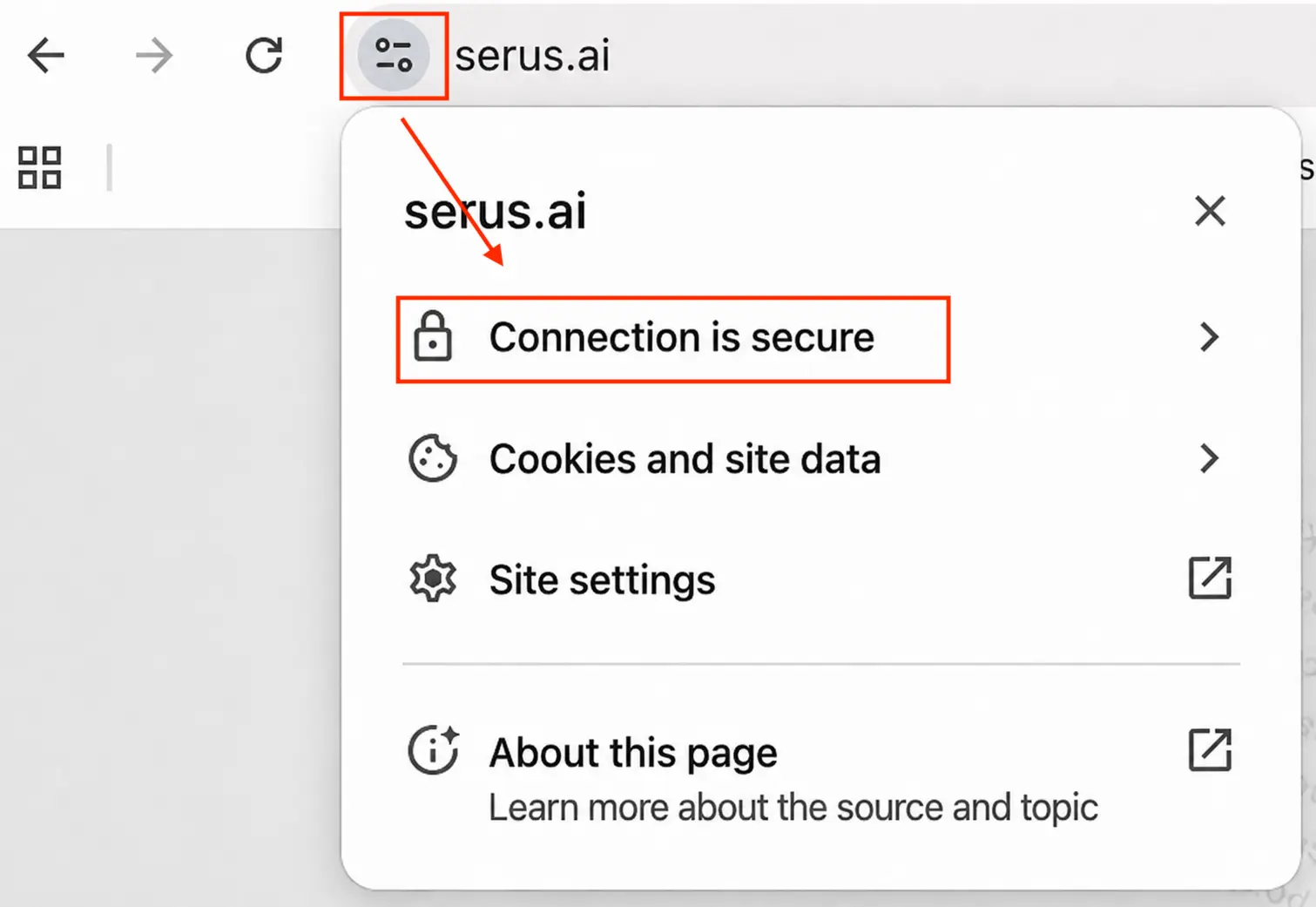
Here's what HTTPS confirms: The data in transit is encrypted.
Here's what it does not confirm: That the site itself is trustworthy.
Scammers register SSL certificates too. A phishing site designed to steal your login details can and often does have a padlock icon. HTTPS is a starting condition, not a final verdict.
Examine the URL carefully
Scam sites are built to be mistaken for real ones. The methods are specific:
Typosquatting: Registering a domain that's one typo away from a legitimate site. For example "paypa1.com" instead of "paypal.com."
Homograph attacks: Swapping Latin characters for visually identical ones from other scripts. In some fonts, a Latin "o" and a Greek omicron look identical.
Subdomain tricks: Creating URLs like "secure-login-yourbank.com" that appear legitimate at a glance.
URL shorteners: Hiding the real destination behind a shortened link. If you're unsure, expand the URL before clicking.
Before entering any information, look at the full domain. The real part is what comes immediately before the final slash, not what comes after it. "yourbank.secure-login.com" is owned by secure-login.com, not your bank.
Watch for browser warnings
Modern browsers do some of the work for you. If a site has a known safety issue, Chrome, Firefox, Safari, and Edge will interrupt your visit with a full-screen warning, typically saying "Your connection is not private" or "Deceptive site ahead."
If you see one of those warnings, close the window. Do not click through unless you have a specific reason to trust the site and know exactly what you are doing.
What browsers cannot catch: New scam sites that haven't been flagged yet, legitimate-looking sites recently compromised by malware, and sites that collect your data without breaking any visible technical rules.
The Deeper Checks: When You Need More Than a Glance
Find the privacy policy
Every reputable site operating in the EU, UK, US, or most of the developed world is legally required to have a privacy policy. Look for it in the footer.
Reading it reveals what data the site collects, how long they keep it, who they share it with, and whether they sell it to third parties. A missing privacy policy is a red flag. A privacy policy written in deliberately vague language is also worth noting.

Check third-party reviews
Search the site name alongside terms like "reviews," "scam," or "complaints." Platforms like Trustpilot aggregate real customer experiences. Patterns matter more than individual reviews, consistent complaints about fraud, no fulfilment, or unexpected charges are meaningful signals.
Be skeptical in the other direction too. A site with hundreds of near-identical five-star reviews with no specifics may be manipulating its rating. Trustpilot flags companies under investigation and removes reviews identified as fake, but no platform catches everything.
Look for verifiable contact information
Legitimate businesses provide a way to reach them, a real address, a working email, a customer support phone number. If none of these exist, that is a signal that whoever runs the site doesn't want to be contactable.
If you find contact details but remain uncertain, use them. Send an email or call. If you get no response, or if whoever answers has no knowledge of the website, treat that as confirmation.
Analyze the design and writing
Scam sites are often built quickly. Look for:
Spelling mistakes and grammatical errors in the body text
Mismatched fonts or inconsistent branding
Broken images or links that go nowhere
Pages that look slightly off compared to the brand they're imitating
Generic stock photos that feel disconnected from the content
Professional businesses invest in their web presence. Poor execution doesn't guarantee a scam, but it raises the threshold for trust.
Be suspicious of excessive pop-ups
One or two pop-ups, a cookie notice or a newsletter sign-up, are normal. A site that immediately floods you with multiple overlapping windows, especially ones claiming you've won something or warning you about a security issue, is a different situation.
Pop-ups that ask for financial information, or that generate fake security warnings telling you to "download protection now," are either scareware or a sign of malvertising. Close the browser window entirely. On Windows: Alt + F4. On Mac: Command + W.
Run the URL through a safety checker
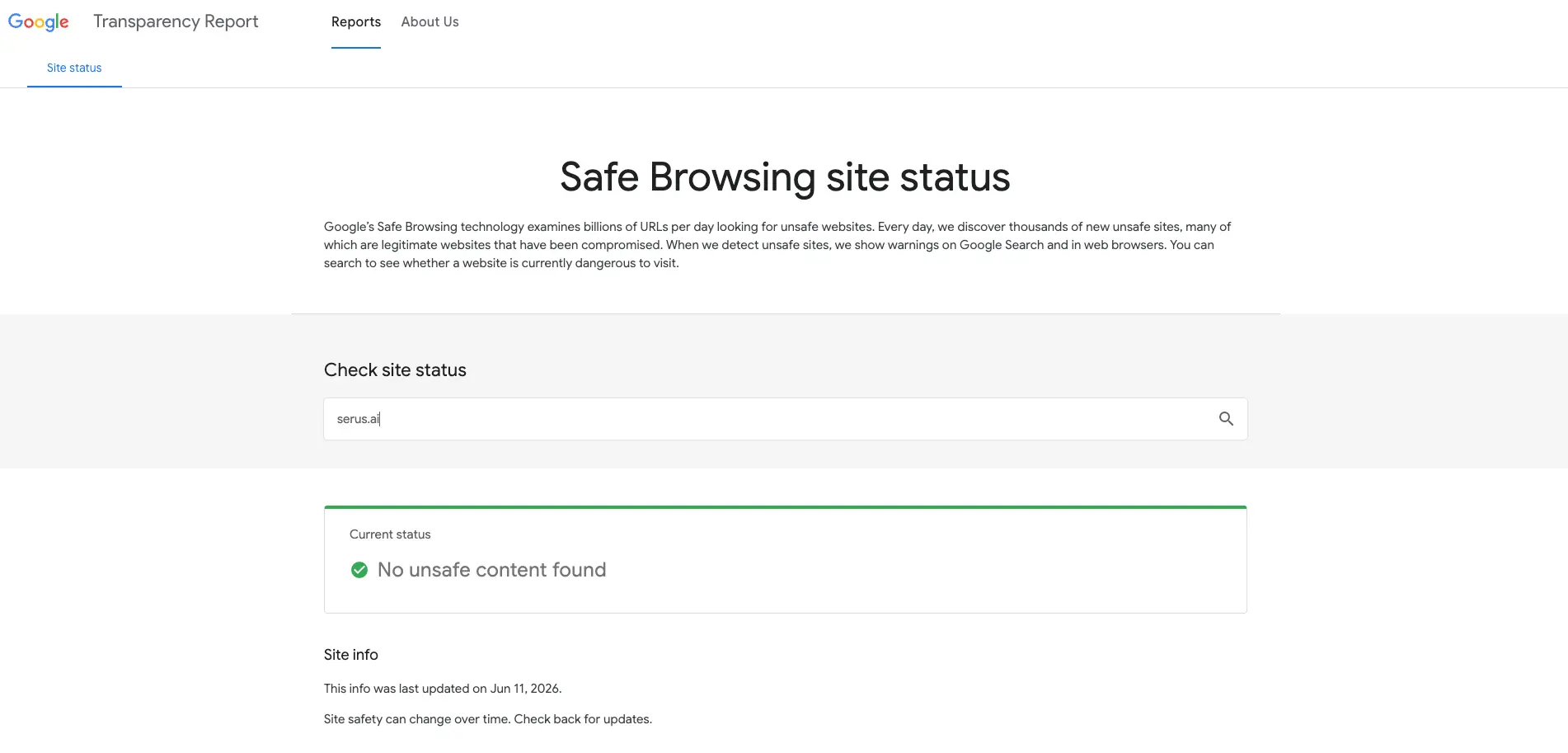
Before entering personal data on an unfamiliar site, run the URL through Google Safe Browsing (Transparency Report), where Google scans billions of URLs per day. Paste the URL to see if any dangerous content has been flagged.
Use your browser's built-in security settings
Most browsers include privacy and security controls that are not enabled by default. Take five minutes to review them:
Chrome: Settings > Privacy and security
Firefox: Settings > Privacy & Security
Edge: Settings > Privacy, search, and services
Safari: Settings > Privacy
Enable Enhanced Safe Browsing in Chrome for real-time protection against phishing. Turn on HTTPS-Only Mode in Firefox to force encrypted connections on every site.
What "Safe" Doesn't Cover
There's something the standard website safety checklist doesn't address, and it matters.
A website can pass every check above and still put your data at risk. Not through malware. Not through a stolen credential. Through its own privacy practices.
Legitimate sites collect your email, your browsing behavior, your purchase history, your IP address. Many sell or license this data to data brokers, who aggregate it into detailed profiles and make it available for purchase. This is legal in most jurisdictions. It happens at scale. It happens on sites you trust.
So, what does this mean?
Your name, email address, phone number, and location end up indexed across dozens of data broker databases, and eventually, in the hands of people running targeted scams.
A website being safe to browse doesn't mean your exposure ends when you close the tab.
Proactive defense is the only real solution. Knowing what a site does after you leave, monitoring where your data surfaces, and removing it from places it shouldn't be gives you the full picture of digital safety.
Serus finds, monitors, and removes your personal data across the surface web, data broker sites, and the dark web. It is privacy on autopilot – built for people who want to stop reacting and start controlling.
FAQ
How to tell if a website is a scam?
Look for a combination of signals: no HTTPS, a slightly misspelled domain, no privacy policy, no verifiable contact information, aggressive pop-ups, and overwhelmingly generic or absent reviews. One red flag may be explainable. Multiple flags together are a strong indicator. Run the URL through Google Safe Browsing before entering any personal information.
How do you know if a website is secure to buy from?
In addition to HTTPS, check that the site accepts standard, traceable payment methods (credit cards, PayPal). Avoid sites that only accept bank transfers, cryptocurrency, or gift cards. Verify there is a clear returns policy, real contact details, and third-party reviews on Trustpilot or similar platforms.
What should I do if I visit a fake website?
Close the browser immediately. Clear your history, cookies, and cache. If you entered a password, change it now from a separate, trusted device and terminate all active sessions. Enable two-factor authentication on that account. If you entered payment details, contact your bank. Run an antivirus scan on your device.
How to find out if a website is legit?
Search the company name with the word "reviews" or "scam" in a separate browser tab. Look for the site on Trustpilot. Check who owns the domain using a WHOIS lookup. Verify that the contact information on the site matches what appears in independent sources. If the company claims to be established, check that the domain has been registered for more than a year.