Updated
What Is a Man-in-the-Middle Attack and How Can You Avoid One?

Head of Product & Co-Founder

Reviewed by Argjent Sahiti
CTO
A man-in-the-middle (MITM) attack is when someone secretly places themselves between you and a website, app, Wi-Fi network or person, so they can read or change the information you send. You can lower the risk by using HTTPS sites, staying off important accounts on open public Wi-Fi, using a VPN on public networks and turning on multi-factor authentication.
Key takeaways
- A man-in-the-middle attack puts someone between you and a service so they can read or change what you send.
- Browser certificate warnings, a site switching from HTTPS to HTTP and unexpected login redirects are common warning signs.
- A fake public Wi-Fi network named like a café, airport or hotel hotspot is one of the simplest ways in.
- Avoid logging in or paying on open Wi-Fi, and use a VPN to encrypt your traffic on public networks.
- Reverse-proxy phishing pages can steal session cookies and sometimes get around multi-factor authentication.
Below: how these attacks work, the warning signs, the most common types and real cases, and the steps that protect you.
What is a man-in-the-middle attack?
In practice, a MITM attack can let someone see login details, payment information, account data or private messages while they're being sent. From your side, the connection still looks normal. You think you're talking directly to a trusted website, Wi-Fi network or person, while the attacker quietly relays everything in between.
"Man-in-the-middle" is still the common term, but some organisations and security experts prefer more neutral or precise ones: on-path attack, adversary-in-the-middle (AITM), machine-in-the-middle or manipulator-in-the-middle. These fit better when the thing in the middle isn't a person but a bot, device or malicious software.
What is the purpose of a man-in-the-middle attack?
Usually, to get information that should stay private: login details, payment information, personal data or messages.
Sometimes the goal is to change that information, not just read it. An attacker might alter payment details, redirect you to a fake website or use stolen login credentials to get into an account. Either way, the attack takes advantage of a connection you believe is safe, which is what makes it hard to notice.
> Also read: Understand the different types of exposure
How does a man-in-the-middle attack work?
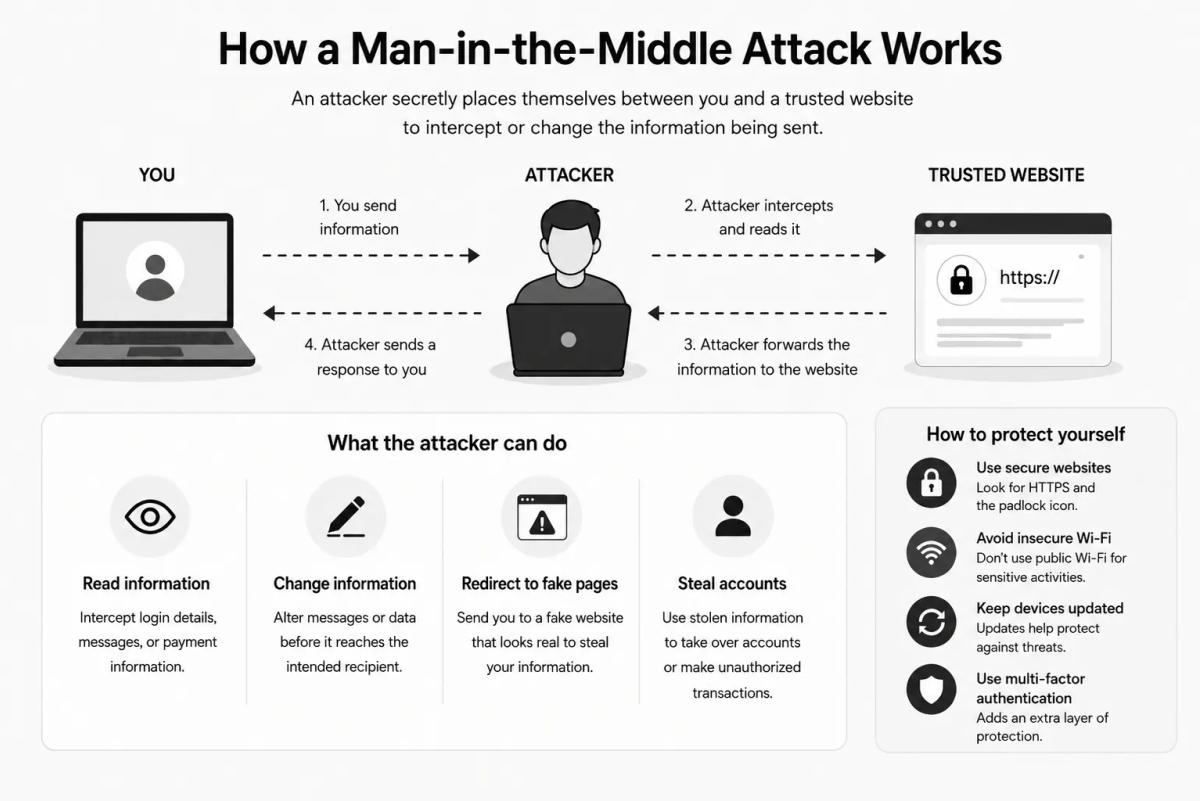
Think of someone secretly standing between you and the person you're talking to. You think your message goes straight to the right place, but the attacker receives it first, reads it and then passes it on.
Online, this can happen between you and a trusted website, app, email account or Wi-Fi network. The connection still looks normal, but the attacker may be able to see or change what you send.
Say you connect to what looks like a café's public Wi-Fi. If the network is fake or unsecured, an attacker can use it to monitor your activity, and when you log in to an account or enter payment details, that information can be intercepted. A MITM attack can also start with a phishing link, a fake website or malware in your browser. Once the attacker is in the middle, they may collect login details, payment data or private messages, redirect you to fake pages or change information before it reaches the intended recipient.
 Expand
> Also read: How to Protect Yourself and Your Data from Internet Hackers
Signs of a man-in-the-middle attack
These attacks are hard to spot because the connection looks normal. Some warning signs that your data may be intercepted or redirected:
- Browser warnings about an unsafe or invalid security certificate
- A website switching from HTTPS to HTTP
- Unexpected redirects to login or payment pages
- Public Wi-Fi networks with names similar to trusted ones
- Frequent connection drops or unusually slow browsing
- Login alerts from unknown devices or locations
- Messages, emails or transactions that seem to have been changed
None of these proves a MITM attack on its own, but each is worth taking seriously.
Common types of man-in-the-middle attacks
The method varies, but the goal is the same: intercept information while it passes between two trusted parties.
| Type | How it works | What the attacker gets |
|---|---|---|
| Email hijacking | The attacker gets into a company's or organisation's email account and monitors conversations. | A trusted account to send convincing messages from, for example to change payment details or ask for transfers to a fraudulent account. |
| Session hijacking | The attacker steals the session cookie that tells a website you're logged in. | The ability to act as you without your password, with access to account information or payment details. |
| Wi-Fi eavesdropping | The attacker runs or monitors an unsecured or fake public Wi-Fi network, often named like a trusted business or hotspot in an airport, café, hotel or city centre. | Login details, payment information or personal data you enter while connected. |
Table: Three common man-in-the-middle attacks compared
What is an example of a man-in-the-middle attack?
The simplest example is a fake public Wi-Fi network that looks like it belongs to a café, airport, hotel or other trusted place. When you connect, the attacker sits between you and the websites or apps you use. That can let them see your login details, collect payment information, read private messages, redirect you to fake websites and capture account or session data.
Real-world examples of MITM attacks
DigiNotar certificate breach. In 2011, hackers breached the Dutch certificate authority DigiNotar and created fraudulent SSL certificates for major websites, including Google. A rogue google.com certificate was used to intercept users who believed they were on a secure connection.
Lenovo Superfish adware. Some Lenovo computers shipped with pre-installed adware called Superfish. It used a self-signed root certificate to intercept encrypted HTTPS traffic and serve targeted ads. The US Cybersecurity and Infrastructure Security Agency (CISA) warned that Superfish left users open to HTTPS spoofing, the exact weakness a man-in-the-middle attacker needs.
Reverse-proxy phishing. In more advanced attacks, criminals use fake login pages to collect passwords, session cookies and other account data. This can sometimes get around multi-factor authentication.
How to prevent a man-in-the-middle attack
Secure connections, updated devices and care on public networks cover most of it.
Step 1: Use secure websites
Before entering personal information, check that the site uses HTTPS and shows a padlock in the browser. Don't enter login details, payment information or other sensitive data on sites that only use HTTP.
Step 2: Avoid unsafe public Wi-Fi
Public Wi-Fi is useful but not always secure. Don't log in to important accounts or make payments on open or unfamiliar networks.
Step 3: Use a VPN on public networks
A VPN encrypts your connection, which makes it harder for attackers to read your information even if the network is compromised.
Don't confuse a VPN with your browser's private window, which is a different tool: here's what incognito mode does and doesn't hide.
Step 4: Turn on multi-factor authentication
Multi-factor authentication (MFA) adds an extra step when you log in. CISA's MFA guidance explains how to turn it on and which methods are strongest. Even if an attacker gets your password, MFA makes it harder for them to get into your account.
Step 5: Keep your devices updated
Updates often include security fixes. Keep your phone, computer, browser, apps and antivirus software up to date to reduce the risk of malware and known vulnerabilities.
Step 6: Be careful with links and login pages
Phishing links can lead to fake websites that look legitimate. Check the web address before entering your details, and be wary of links in unexpected emails, text messages or pop-ups.
Step 7: Use encrypted services
Choose services that use strong encryption for messaging, email, payments and account access. Encryption protects your information while it travels between you and the service.
Questions
Can a VPN protect me from a man-in-the-middle attack?
It can help. A VPN encrypts your internet traffic, which makes it harder for attackers to read your information even if the network is compromised. Combine it with HTTPS websites and multi-factor authentication.
Is it safe to use public Wi-Fi?
Not always. Attackers can set up fake or unsecured networks that look like a café, airport or hotel hotspot and monitor what you do. Avoid logging in to important accounts or making payments on open or unfamiliar networks.
Can someone get into my account without my password?
Yes, through session hijacking. If an attacker steals the session cookie that keeps you logged in, they may be able to act as you without needing your password.
What is another name for a man-in-the-middle attack?
Some security experts prefer on-path attack, adversary-in-the-middle (AITM), machine-in-the-middle or manipulator-in-the-middle. These terms fit cases where the thing in the middle is a bot, device or malicious software rather than a person.
Does HTTPS stop man-in-the-middle attacks?
It helps, so check for HTTPS and the padlock before entering personal information. Take certificate warnings seriously, though: in the DigiNotar breach, hackers created fraudulent certificates for major websites, including Google.

Author
Anthon WanslandHead of Product & Co-Founder
Shapes the Serus product — from the first address-removal service to the platform it is today.

Reviewed by
Argjent Sahiti


